MISC Writeup - 2026 Edition
Table of contents
In this article, we will present the various solutions to the challenges of the Jeanne d’Hack CTF 2026 for the MISC category.
Mobile Odyssey
Category: Misc — Difficulty: Easy
Description
A new mobile game, Mobile Odyssey, is under development.
We are given only the APK mobile_odyssey_v0.0.1.apk. The UI is broken, there is nothing really playable, but the description hints that there might be secret information hidden in the application.
Flag format:
JDHACK{this_is_a_flag}
Solution
Step 1 — Open the APK
The challenge does not provide any backend endpoint to query, only the Android APK.
We open it in a static analysis tool such as:
- jadx-gui (
jadx mobile_odyssey_v0.0.1.apk), or - MobSF (Mobile Security Framework).
The goal is to look for third-party services (Firebase, APIs, etc.) and embedded configuration.
Step 2 — Identify Firebase Remote Config
Browsing the code tree in jadx, we see that the application uses Firebase (presence of com.google.firebase.* packages, google-services.json, etc.).
A good entry point is the com.jeannedhackctf.mobileodyssey.GameActivity class: it shows the initialization of FirebaseRemoteConfig and retrieval of remote values (including sEcre7vALu3).
In general, we search for Remote Config references:
- in Java/Kotlin code (calls to
FirebaseRemoteConfig,getString(...)inGameActivity.java).
A global search for the keyword sEcre7vALu3 quickly reveals where this key is used.
Step 3 — Locate the sEcre7vALu3 key and query Firebase
In GameActivity.java, we see the app fetching a Remote Config value using the key sEcre7vALu3. The code initializes FirebaseRemoteConfig, possibly sets default values, and then calls getString("sEcre7vALu3") to build the message displayed in the app.
The interesting values are not hardcoded in the APK: they come from the associated Firebase project via Remote Config. We therefore need to query Firebase directly to retrieve the value of sEcre7vALu3.
To do this, we can:
- either run the app in an emulator / device and intercept the network traffic (Burp, mitmproxy, …) to observe the Remote Config request and the JSON response;
- or use Firebase’s Remote Config REST API (with the project ID and possibly the API key found in
google-services.json) to fetch the configuration and read thesEcre7vALu3field.
In the Remote Config response, the sEcre7vALu3 key directly contains a Base64-encoded value:
sEcre7vALu3 = SkRIQUNLe00wOGlsZV9ATmRfRjFyRWI0czNfIXNfZnVufQ
Decoding this Base64 string yields:
JDHACK{M08ile_@Nd_F1rEb4s3_!s_fun}
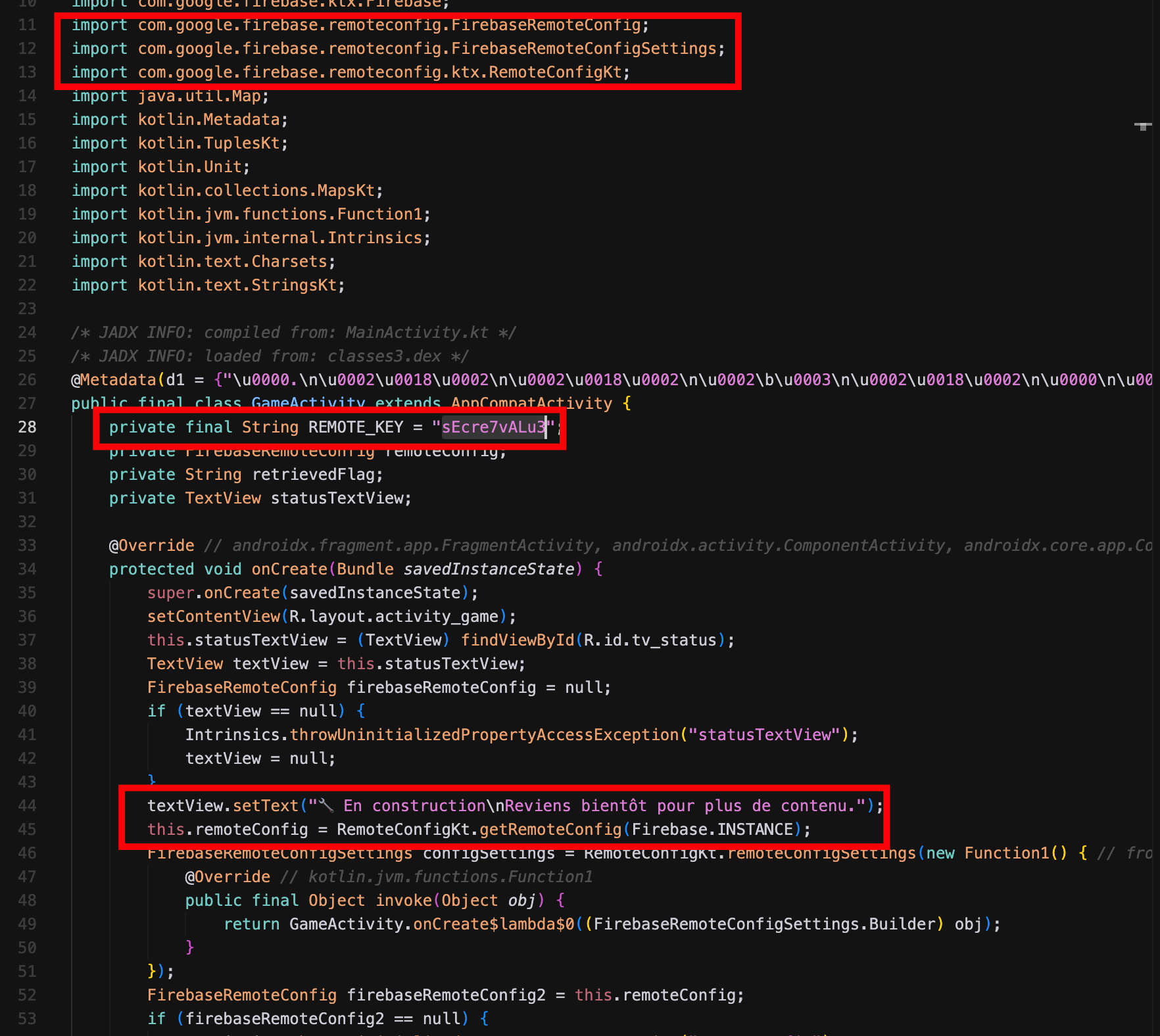
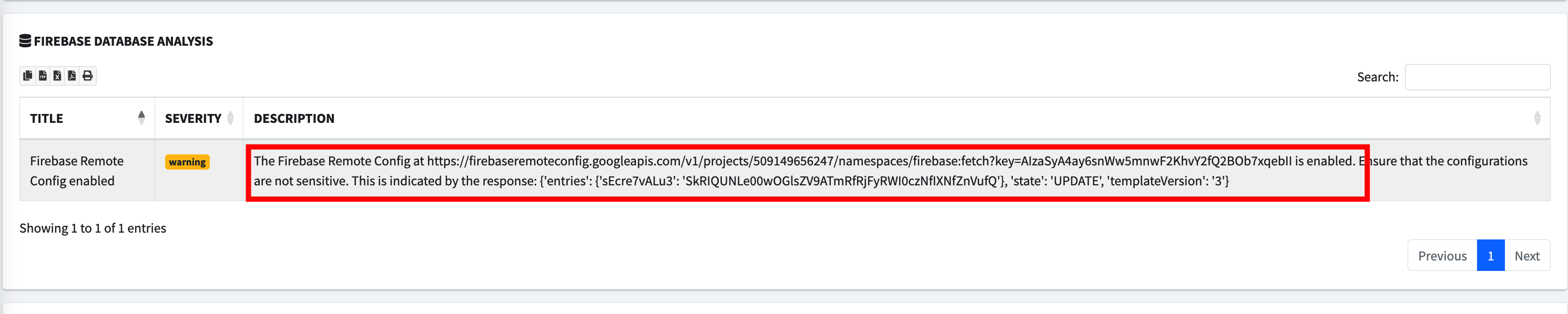
This value is the flag for the challenge.
Flag: JDHACK{M08ile_@Nd_F1rEb4s3_!s_fun}
Goofy Fantasy
The sources for the challenge are available here.
You are on vacation in a distant country, but you’ve forgotten your hotel room password… You wander through the city, hoping it will eventually come back to you.
The flag is hidden within the data of the goofy_fantasy.gif file. You must study the GIF file structure to find it.
The GIF file structure is as follows :
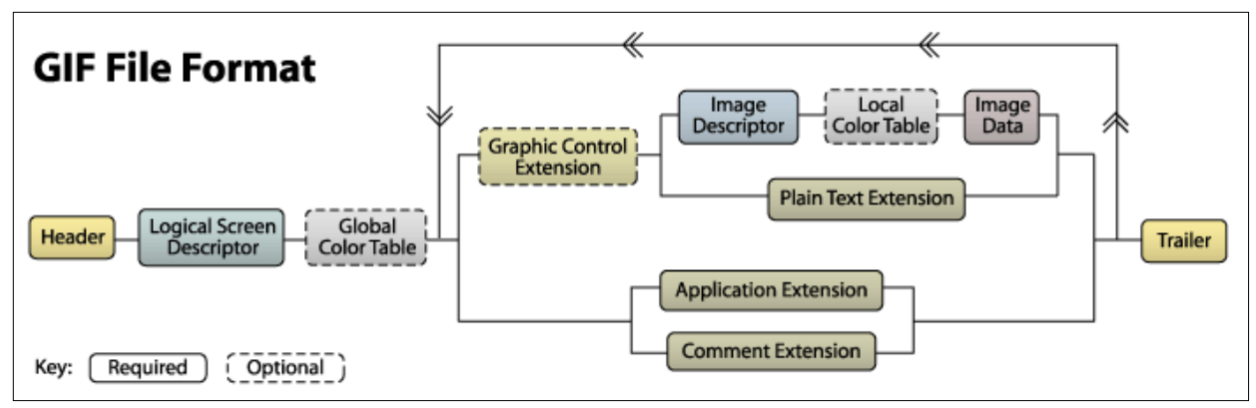
Following the Global Color Table, the file contains the data associated with all the images included in the GIF. Each image therefore corresponds to a loop comprising all the components located between the Global Color Table and the trailer
The trailer is the byte that marks the end of the GIF file: 0x3B.
Among these blocks, let’s examine the composition of the Graphic Control Extension as well as the Image Descriptor.
Graphic Control Extension :
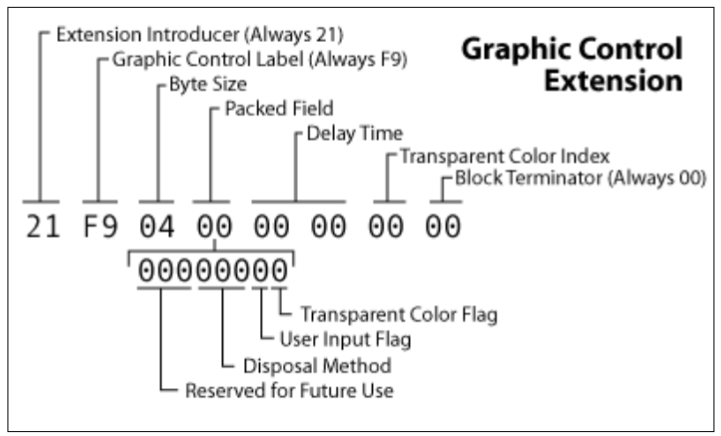
This optional block contains a Packed Fields byte. Bits 5, 6, and 7 are marked as “Reserved” (reserved for future use) and are normally set to zero.
Image Descriptor:
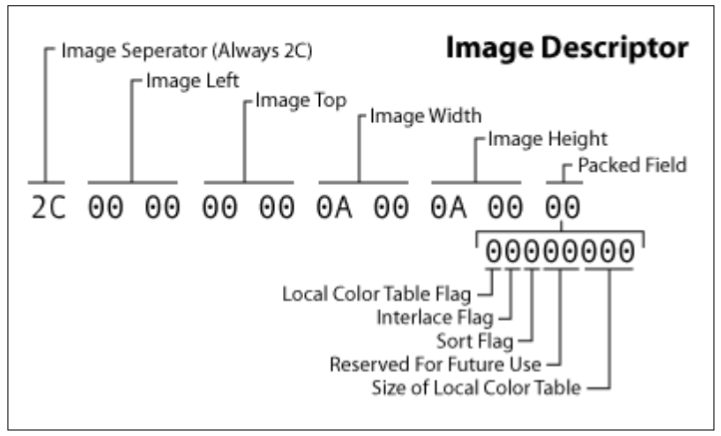
This block also contains a Packed Fields byte (located at offset 9 of the block). Here, bits 3 and 4 are defined as “Reserved”.
These two components possess “unused” bits where data can be discreetly introduced without altering the file’s rendering. However, the documentation indicates that the Graphic Control Extension block is optional. A GIF file can theoretically contain none at all.
Parsing GIF files
To verify the values of these different bits, a parser must be written. You can find a diagrammed summary of the GIF89a standard at this address: https://giflib.sourceforge.net/whatsinagif/bits_and_bytes.html.
There are a few subtleties to take into account. Most blocks have a fixed size, so you simply need to skip over the block once its signature is identified.
Others have variable sizes and require a small calculation. For example:
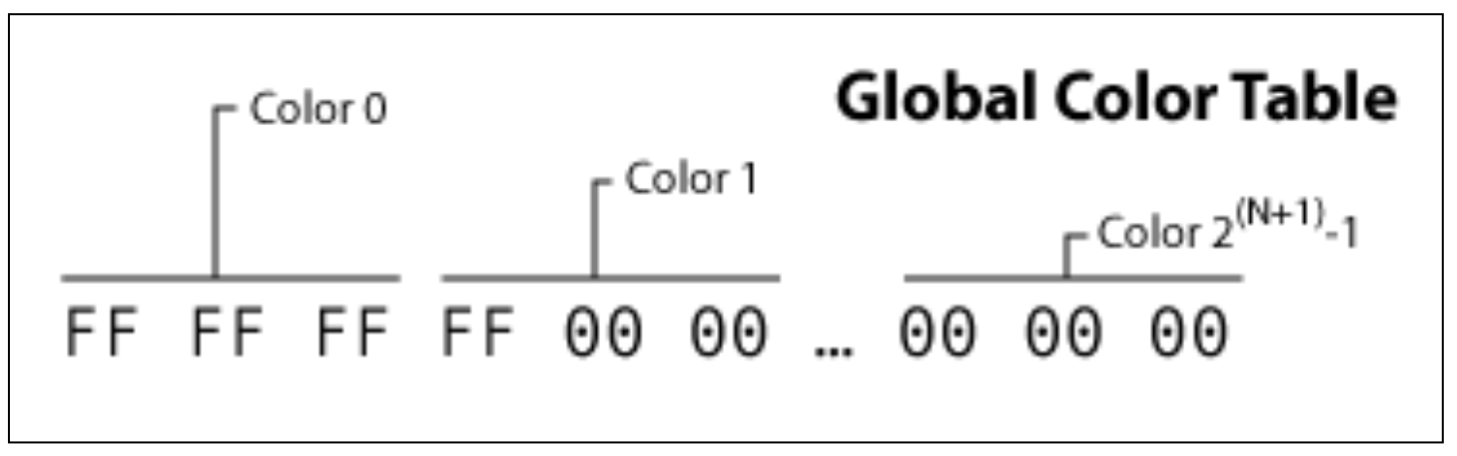
The Global Color Table is an optional block that allows colors to be defined for all images, without them being redefined every time. In other words, it is a constant color macro.
To skip this block, you need to know the value of N. This is located in the previous block.
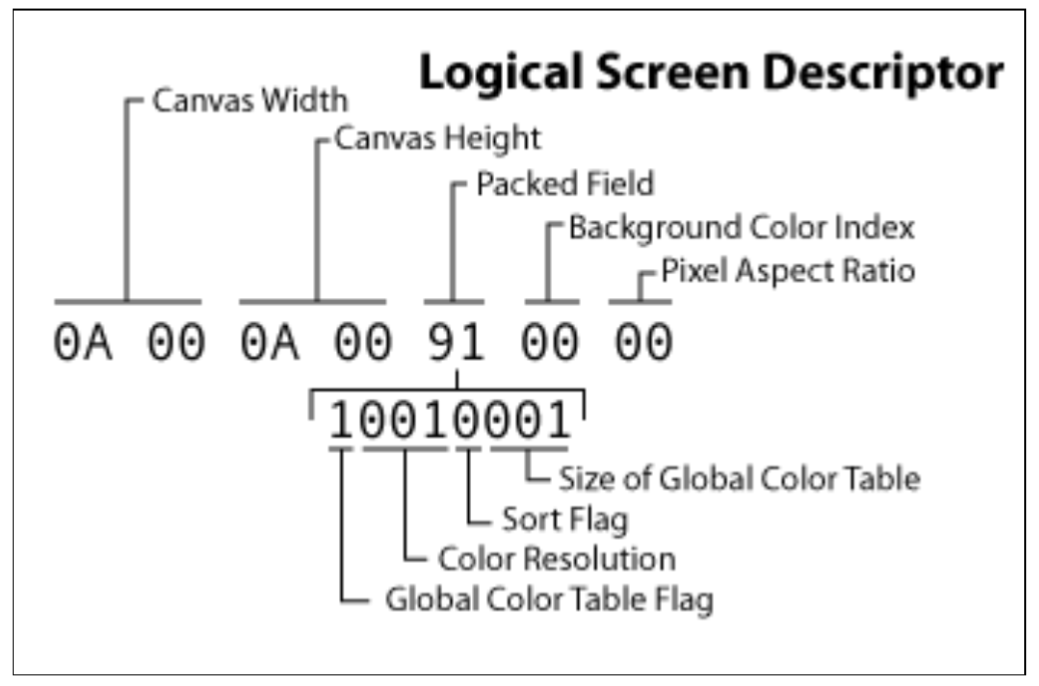
Once parsed, it is noticeable that these reserved bits only fluctuate starting from image $x$ and only within the Image Descriptors.
Thus, by retrieving all the reserved bits from each Image Descriptor and concatenating them, the flag is recovered in ASCII format.
Here is the solve script :
import math
def extract_secret(filename):
    chunks = []
    with open(filename, 'rb') as f:
        f.read(13)
        f.seek(10, 0)
        packed = ord(f.read(1))
        if packed & 0x80:
            n = packed & 0x07
            gct_size = 3 * int(math.pow(2, n + 1))
            f.seek(13 + gct_size, 0)
        else:
            f.seek(13, 0)
        while True:
            byte = f.read(1)
            if not byte: break
            b = ord(byte)
            if b == 0x3B:
                break

            elif b == 0x21:
                f.read(1)
                while True:
                    size = ord(f.read(1))
                    if size == 0: break
                    f.read(size)

            elif b == 0x2C:
                desc = f.read(9)
                chunks.append((desc[8] >> 4) & 0x03) # xxxyyxxx become 000000yy
                if desc[8] & 0x80:
                    lct_n = desc[8] & 0x07
                    lct_size = 3 * int(math.pow(2, lct_n + 1))
                    f.read(lct_size)

                f.read(1)
                while True:
                    size = ord(f.read(1))
                    if size == 0: break
                    f.read(size)
    return chunks

def reconstruct_message(chunks):
    bytes_list = []
    i = 0
    while i < len(chunks):
        if i + 3 >= len(chunks):
            break
        #bytes are recrafted
        bits_8_7 = chunks[i] << 6
        bits_6_5 = chunks[i+1] << 4
        bits_4_3 = chunks[i+2] << 2
        bits_2_1 = chunks[i+3]

        valeur = bits_8_7 | bits_6_5 | bits_4_3 | bits_2_1
        bytes_list.append(valeur)
        i += 4
    data = bytearray(bytes_list).strip(b'\x00')
    return data.decode('utf-8')

if __name__ == "__main__":
    filename = "goofy_fantasy.gif"
    chunks = extract_secret(filename)
    secret = reconstruct_message(chunks)
    print(f"SECRET: {secret}")
After running the script, the obtain flag is : JDHACK{!T_wA5_Re5erveD_fOR_Y0u}.
Navi’s Mania
The sources for the challenge are available here.
Link is trapped in a time loop by the Calamity. He has been opening this chest for eternity, yet it remains hopelessly empty. It is up to you to analyze this dream and extract its true contents
The flag is hidden within an MP4 file. You must study the structure of MP4 files to find it.
May the documentation help you : https://b.goeswhere.com/ISO_IEC_14496-12_2015.pdf
MP4 file’s structure
MP4 files are organized into boxes. Each box contains other boxes, which together form the file’s ecosystem. Each one has a different purpose, a specific size, and a precise type.
An important example of a box is mdat: this one contains all the raw data related to the file’s audio and images.
A box header is always at least 8 bytes long: The first 4 bytes define the total Size of the box. The next 4 bytes define the Type (its name in 4 ASCII characters).
Therefore, to navigate through the tree structure, you simply need to read the size and the name of the box. If it interests us, we “enter” it by reading the following 8 bytes; otherwise, we move forward by the size of the entire box.
Here is the nesting of these boxes according to the ISO/IEC 14496-12 standard:
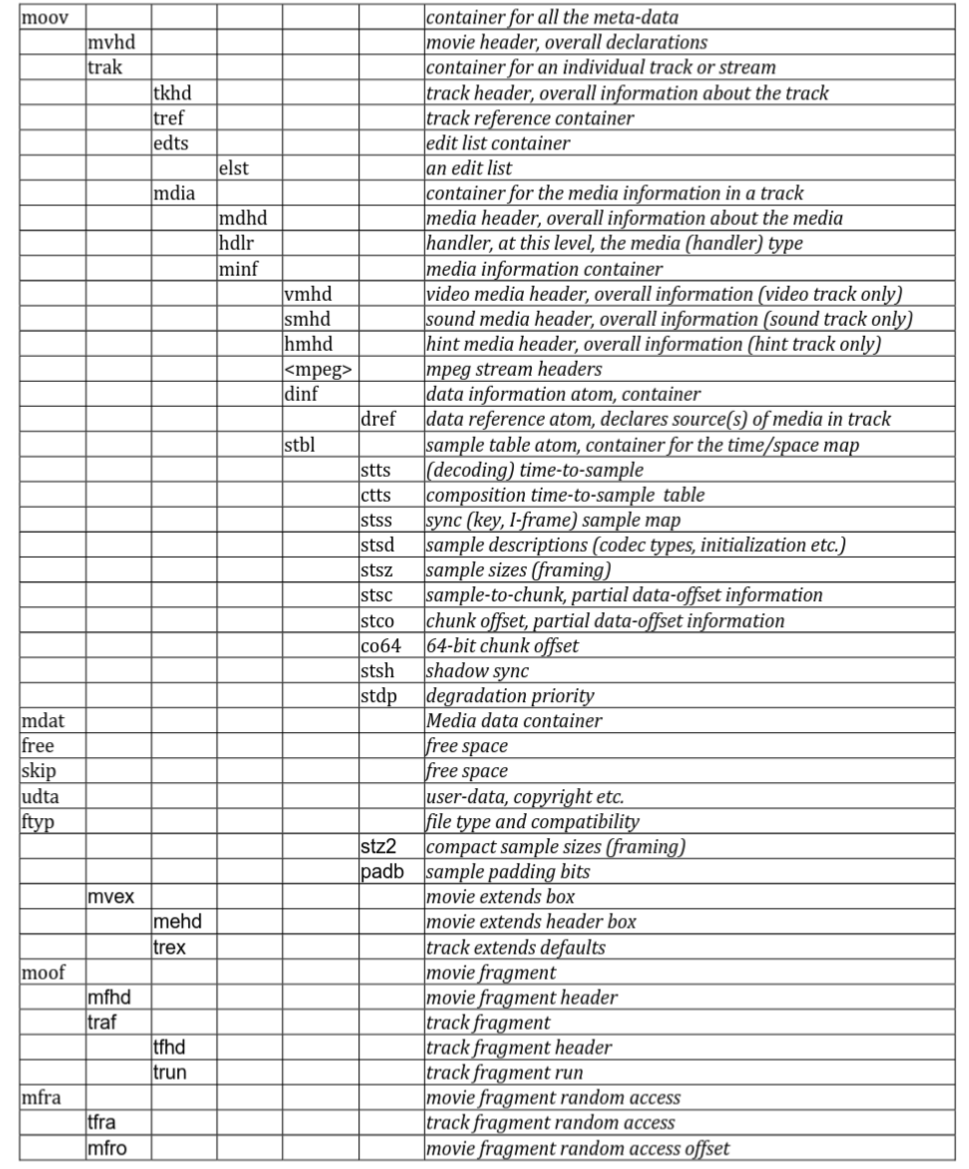
Furthermore, generally all information related to the video is found in two trak atoms: one for audio data and one for video data. When an MP4 file contains multiple tracks, almost all players offer an option to switch between the different tracks contained within the same file.
When using a tool to parse the entire file for a surface view (https://www.onlinemp4parser.com/) we got :
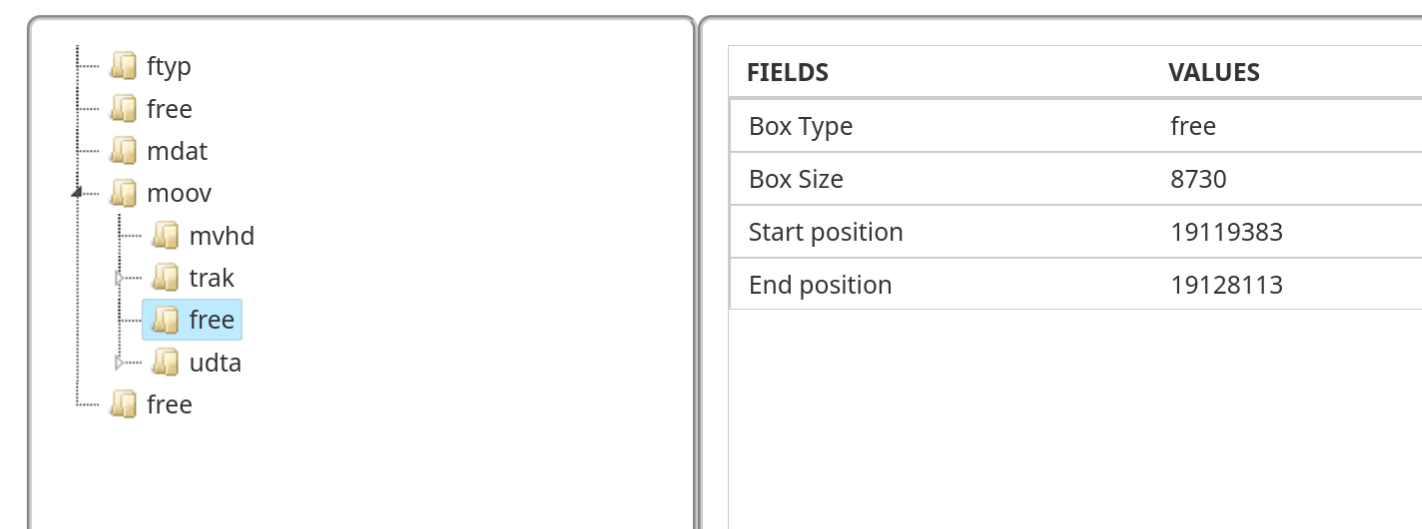
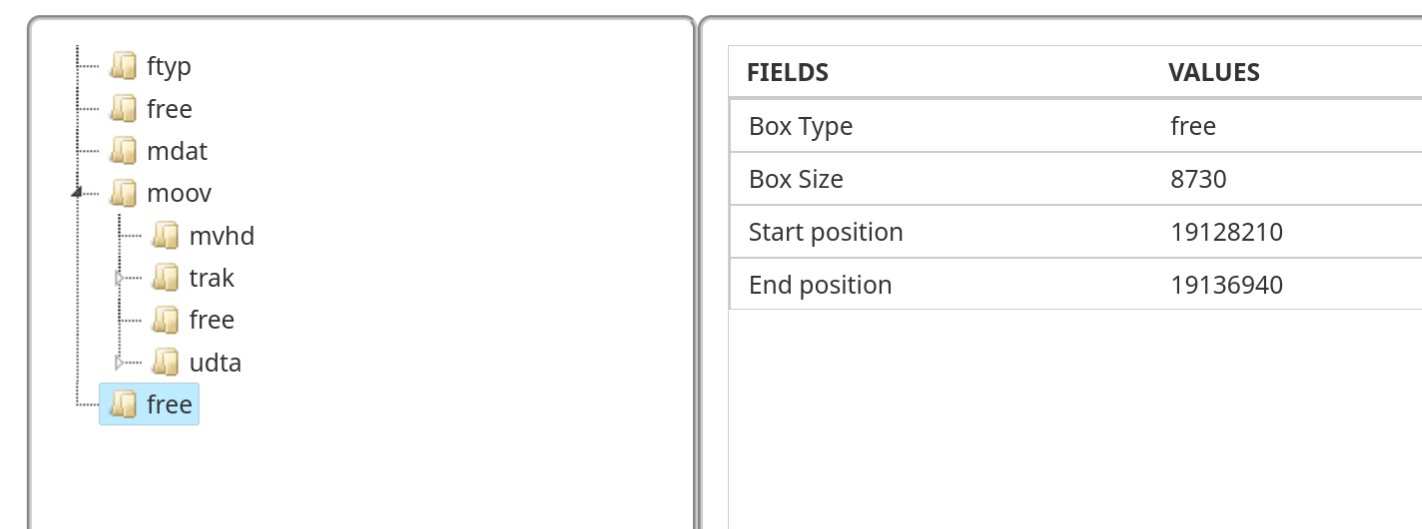
In an MP4 file, the free (or skip) atom is a reserved or “empty” space that contains no multimedia data usable by the player. It mainly serves as a buffer zone: editing software uses it to adjust the file size or insert metadata without having to rewrite the entire content, which makes processing much faster.
We notice two very strange things: first, the second free atom is exactly the same size as the one following the first trak.
Firstly, a free atom of this size is completely unusual. As explained previously, these atoms normally serve as a buffer zone (padding) for data alignment and generally do not exceed a few bytes.
Additionally, trak atoms are usually placed next to each other within the moov atom. It should also be noted that media players, when encountering a free atom, skip over it directly without trying to find out what it contains.
We can then deduce that the free atom following the second trak was actually the track containing the flag. Only the name of the atom was changed.
So, is it enough to just rename it back to trak? Actually no, we quickly realize that the data present there has been randomized. It was then necessary to copy all the data present in the last free atom, which is in fact a copy of the original trak representing the video to be recovered.
Furthermore, to be sure, by analyzing the content of the second free atom, we found the structure of a track atom.
The final step is to insert it in place of the free atom following the first trak and rename the atom to trak. It gives us this solve script :
#include <stdio.h>
#include <string.h>
#include <stdlib.h>
#include <unistd.h>


#define BUFFSIZE 1024

void unhide(FILE * file);


int main(int argc, char ** argv) {
    if(argc != 2) {
        printf("Usage : %s file\n", argv[0]);
        return -1;
    }

    FILE * file = fopen(argv[1], "rb+");
    if(file == NULL) {
        fprintf(stderr, "Error opening file\n");
        return -1;
    }

    unhide(file);
    fclose(file);
    return 0;
}

void unhide(FILE * file){
    int free_cnt = 0;
    while(1) {
        unsigned char header[8];
        long current_pos = ftell(file);

        if (fread(header, 1, 8, file) != 8) break;
        size_t size = (header[0] << 24) | (header[1] << 16) | (header[2] << 8) | header[3];

        if (strncmp((char*)&header[4], "moov", 4) == 0) {
            continue;
        }
        if(strncmp((char*)&header[4], "free", 4) == 0) {
            free_cnt++;
            if (free_cnt == 2) {
                unsigned char *buffer = malloc(size - 8);
                fseek(file, -(long)size, SEEK_END);
                fseek(file, 8, SEEK_CUR);

                fread(buffer, 1, size - 8, file);
                ftruncate(fileno(file), ftell(file) - size);

                fseek(file, current_pos, SEEK_SET);

                memcpy(&header[4], "trak", 4);
                fwrite(header, 1, 8, file);
                fwrite(buffer, 1, size - 8, file);

                free(buffer);
                break;
            }
            fseek(file, -(long)(size - 8), SEEK_CUR);
        }
        fseek(file, size - 8, SEEK_CUR);
    }
}
After running the script, the obtain flag is : JDHACK{l0st_tRaK$_!n_Th3_wO0d}.
Blind Distribution
The sources for the challenge are available here.
Your nephew was thrilled to have recorded his very first video of his favorite game. Unfortunately, he spilled coffee all over his laptop, and now his video isn’t loading correctly anymore… Help him recover the original footage!
You will find the flag by watching the video gameplay.mp4 once it has been restored to its original state.
In the resolution of navi’s mania, we explored the composition of mp4 files.
But what is the link between this black screen and the various atoms that make up the file?
There are several reasons why an MP4 player might fail to display any image while still playing the audio track.
In this case, we need to focus on the stco atom (Chunk Offset Box).
This is one of the most important atoms, as it indicates for each video chunk which offset within the mdat atom to go to in order to find the corresponding data.
A chunk is a set of one or more frames (an image). In an MP4 file, to prevent the player from constantly jumping back and forth between the audio and video tracks, the data is split into these small blocks called chunks. Therefore, you usually find a video chunk, followed by an audio chunk, and so on, interleaved within the mdat atom.
Thus, the stco atom contains a table that lists the exact location of each chunk:
-
Chunk 1 -> Offset X
-
Chunk 2 -> Offset Y
-
…
Without these indexes, the player cannot know where the raw data starts and ends within the mdat, rendering the video unplayable.
When analyzing the stco box:
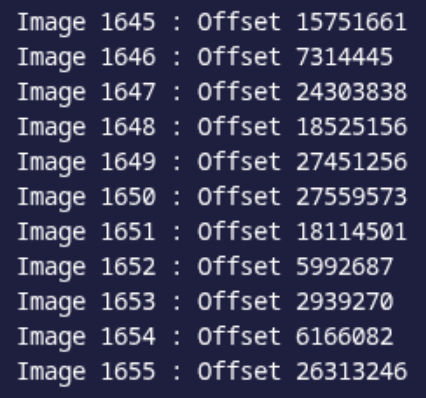
We notice that the offsets associated with the different chunks are out of order. However, in a standard MP4 file, these addresses within the stco atom must almost systematically appear in ascending order, as they follow the physical progression of the data in the mdat atom.
By simply sorting this list to put the addresses back into the correct numerical order, we realign the playback with the actual position of the data on the disk, allowing the original video to be recovered.
It gives us this solve script :
#include <stdio.h>
#include <string.h>
#include <stdlib.h>
#include <stdint.h>
#include <time.h>
#include <arpa/inet.h>

// Comparison function for qsort
int compare_offsets(const void *a, const void *b);

int main(int argc, char ** argv) {
    srand(time(NULL));

    if(argc != 2) {
        printf("Usage : %s file\n", argv[0]);
        return -1;
    }

    FILE * file = fopen(argv[1], "rb+");
    if(file == NULL) {
        fprintf(stderr, "Error opening file\n");
        return -1;
    }

    while(1) {
        unsigned char header[8];
        if (fread(header, 1, 8, file) != 8) break;

        size_t size = (header[0] << 24) | (header[1] << 16) | (header[2] << 8) | header[3];
        char *type = (char*)&header[4];

        // Path to reach stco directly: [b.goeswhere.com/ISO_IEC_14496-12_2015.pdf](https://b.goeswhere.com/ISO_IEC_14496-12_2015.pdf) (brand isom)
        if (strncmp(type, "moov", 4) == 0) continue;
        if (strncmp(type, "trak", 4) == 0) continue;
        if (strncmp(type, "mdia", 4) == 0) continue;
        if (strncmp(type, "minf", 4) == 0) continue;
        if (strncmp(type, "stbl", 4) == 0) continue;

        if (strncmp(type, "stco", 4) == 0) {
            unsigned char meta[8];
            fread(meta, 1, 8, file);

            uint32_t raw_count;
            memcpy(&raw_count, &meta[4], 4);
            size_t count = ntohl(raw_count);
            // List of all offsets
            uint32_t *offsets = malloc(count * sizeof(uint32_t));
            fread(offsets, sizeof(uint32_t), count, file);

            // Sorting the scrambled offset list
            qsort(offsets, count, sizeof(uint32_t), compare_offsets);

            fseek(file, -(long)(count * sizeof(uint32_t)), SEEK_CUR);
            fwrite(offsets, sizeof(uint32_t), count, file);

            free(offsets);
            break;
        }
        fseek(file, size - 8, SEEK_CUR);
    }
    fclose(file);
    return 0;
}

int compare_offsets(const void *a, const void *b) {
    unsigned int val_a = ntohl( *(unsigned int*)a );
    unsigned int val_b = ntohl( *(unsigned int*)b );
    if (val_a < val_b) return -1;
    if (val_a > val_b) return 1;
    return 0;
}
After running the script, the obtain flag is : JDHACK{g0Od_oFF$eT_Go0D_CHUnK5}.